


確認ですが質問のコードは全て自作でしょうか?どこまで思った通りに動作しているか分かりますか?
 Q&A
Q&A

総合スコア0
投稿2023/07/05 14:59
2枚の画像の平行化処理した画像を出力する
webカメラ2台を使用して撮影した画像からキャリブレーションを行い、内部、外部パラメータを求めて平行化マップを計算した。その計算した数値を使い平行化処理を画像2枚に対して行う
実行して表示された画像が斜めって表示されており、正しく平行化されているのかが分かっていない。
斜めではなく表示するにはどうすればいいのでしょうか。
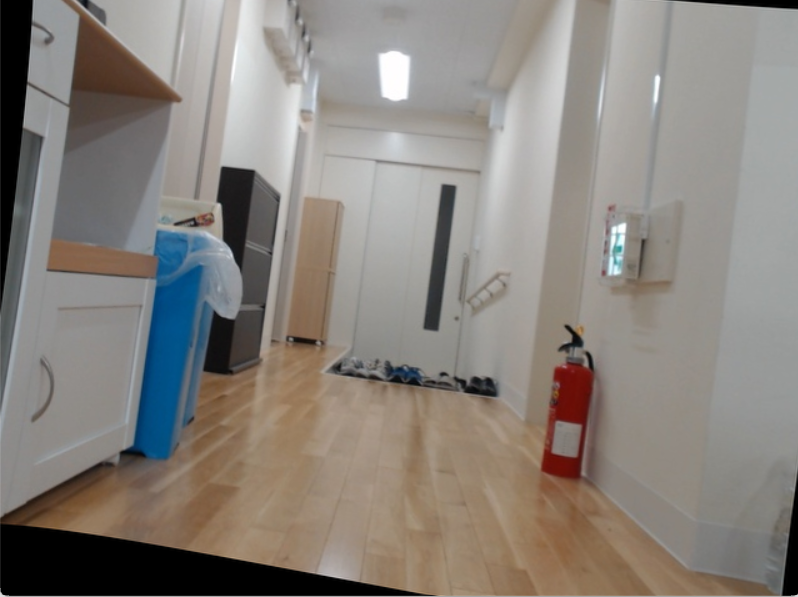
エラーメッセージ


### 該当のソースコード
このコードでキャリブレーションを行いました。
import numpy as np
import cv2
from tqdm import tqdm

# Set the path to the images captured by the left and right cameras
#画像のパス設定
pathL = "./sutereo_L/"
pathR = "./sutereo_R/"

      #各3Dパターンの画像座標を抽出しています
print("Extracting image coordinates of respective 3D pattern ....\n")

#検出したコーナーを
# Termination criteria for refining the detected corners

criteria = (cv2.TERM_CRITERIA_EPS + cv2.TERM_CRITERIA_MAX_ITER, 30, 0.001)


objp = np.zeros((10*7,3), np.float32)
objp[:,:2] = np.mgrid[0:10,0:7].T.reshape(-1,2)

img_ptsL = []
img_ptsR = []
obj_pts = []

for i in tqdm(range(0,15)):
	imgL = cv2.imread(pathL+"camera1_%d.jpg"%i)
	imgR = cv2.imread(pathR+"camera2_%d.jpg"%i)
	imgL_gray = cv2.imread(pathL+"camera1_%d.jpg"%i,0)
	imgR_gray = cv2.imread(pathR+"camera2_%d.jpg"%i,0)

	outputL = imgL.copy()
	outputR = imgR.copy()

	retR, cornersR =  cv2.findChessboardCorners(outputR,(10,7),None)
	retL, cornersL = cv2.findChessboardCorners(outputL,(10,7),None)

	if retR and retL:
		obj_pts.append(objp)
		cv2.cornerSubPix(imgR_gray,cornersR,(5,5),(-1,-1),criteria)
		cv2.cornerSubPix(imgL_gray,cornersL,(5,5),(-1,-1),criteria)
		cv2.drawChessboardCorners(outputR,(10,7),cornersR,retR)
		cv2.drawChessboardCorners(outputL,(10,7),cornersL,retL)
		cv2.imshow('cornersR',outputR)
		cv2.imshow('cornersL',outputL)
		cv2.waitKey(0)

		img_ptsL.append(cornersL)
		img_ptsR.append(cornersR)


print("Calculating left camera parameters ... ")
# Calibrating left camera
retL, mtxL, distL, rvecsL, tvecsL = cv2.calibrateCamera(obj_pts,img_ptsL,imgL_gray.shape[::-1],None,None)
hL,wL= imgL_gray.shape[:2]
new_mtxL, roiL= cv2.getOptimalNewCameraMatrix(mtxL,distL,(wL,hL),1,(wL,hL))

print("Calculating right camera parameters ... ")
# Calibrating right camera
retR, mtxR, distR, rvecsR, tvecsR = cv2.calibrateCamera(obj_pts,img_ptsR,imgR_gray.shape[::-1],None,None)
hR,wR= imgR_gray.shape[:2]
new_mtxR, roiR= cv2.getOptimalNewCameraMatrix(mtxR,distR,(wR,hR),1,(wR,hR))


print("Stereo calibration .....")
flags = 0
flags |= cv2.CALIB_FIX_INTRINSIC
# Here we fix the intrinsic camara matrixes so that only Rot, Trns, Emat and Fmat are calculated.
# Hence intrinsic parameters are the same

criteria_stereo= (cv2.TERM_CRITERIA_EPS + cv2.TERM_CRITERIA_MAX_ITER, 30, 0.001)


# This step is performed to transformation between the two cameras and calculate Essential and Fundamenatl matrix
retS, new_mtxL, distL, new_mtxR, distR, Rot, Trns, Emat, Fmat = cv2.stereoCalibrate(obj_pts,
                                                          img_ptsL,
                                                          img_ptsR,
                                                          new_mtxL,
                                                          distL,
                                                          new_mtxR,
                                                          distR,
                                                          imgL_gray.shape[::-1],
                                                          criteria_stereo,
                                                          flags)

# Once we know the transformation between the two cameras we can perform stereo rectification
# StereoRectify function
rectify_scale= 1 # if 0 image croped, if 1 image not croped
rect_l, rect_r, proj_mat_l, proj_mat_r, Q, roiL, roiR= cv2.stereoRectify(new_mtxL, distL, new_mtxR, distR,
                                                 imgL_gray.shape[::-1], Rot, Trns,
                                                 rectify_scale,(0,0))

# Use the rotation matrixes for stereo rectification and camera intrinsics for undistorting the image
# Compute the rectification map (mapping between the original image pixels and
# their transformed values after applying rectification and undistortion) for left and right camera frames
Left_Stereo_Map= cv2.initUndistortRectifyMap(new_mtxL, distL, rect_l, proj_mat_l,
                                             imgL_gray.shape[::-1], cv2.CV_16SC2)
Right_Stereo_Map= cv2.initUndistortRectifyMap(new_mtxR, distR, rect_r, proj_mat_r,
                                              imgR_gray.shape[::-1], cv2.CV_16SC2)


print("Saving paraeters ......")
cv_file = cv2.FileStorage("data/params_py.xml", cv2.FILE_STORAGE_WRITE)
cv_file.write("Left_Stereo_Map_x",Left_Stereo_Map[0])
cv_file.write("Left_Stereo_Map_y",Left_Stereo_Map[1])
cv_file.write("Right_Stereo_Map_x",Right_Stereo_Map[0])
cv_file.write("Right_Stereo_Map_y",Right_Stereo_Map[1])
cv_file.release()


ーーーーーーーーーーーーーーーーーーーーーーーーーーーーーーーーーーーーーーーーーーーーーーーーーーーーーー
次に平行化を行うコードを示します。
import numpy as np
import cv2

# 読み込む画像のパス
pathL = "./parallel/camera1_sample2.jpg"
pathR = "./parallel/camera2_sample2.jpg"

# ステレオカメラのパラメータファイル
params_file = "data/params_py.xml"

# 画像の読み込み
imgL = cv2.imread(pathL)
imgR = cv2.imread(pathR)

# ステレオカメラのパラメータの読み込み
cv_file = cv2.FileStorage(params_file, cv2.FILE_STORAGE_READ)
Left_Stereo_Map_x = cv_file.getNode("Left_Stereo_Map_x").mat()
Left_Stereo_Map_y = cv_file.getNode("Left_Stereo_Map_y").mat()
Right_Stereo_Map_x = cv_file.getNode("Right_Stereo_Map_x").mat()
Right_Stereo_Map_y = cv_file.getNode("Right_Stereo_Map_y").mat()
cv_file.release()

# 画像の平行化
outputL = cv2.remap(imgL, Left_Stereo_Map_x, Left_Stereo_Map_y, cv2.INTER_LANCZOS4)
outputR = cv2.remap(imgR, Right_Stereo_Map_x, Right_Stereo_Map_y, cv2.INTER_LANCZOS4)

# 平行化された左右の画像を表示
cv2.imshow("Rectified Left Image", outputL)
cv2.imshow("Rectified Right Image", outputR)
cv2.waitKey(0)
cv2.destroyAllWindows()


### 試したこと
パラメーラの妥当性確認

### 補足情報(FW/ツールのバージョンなど)
出力されたパラメータを記載します。

Left Camera Matrix:
[[645.06275565   0.         332.32329196]
 [  0.         646.19435302 225.40499002]
 [  0.           0.           1.        ]]
Left Distortion Coefficients:
[[ 0.05016129 -0.01679789  0.00309687  0.00344186 -0.556103  ]]
Left Rectification Matrix:
[[ 0.98153948 -0.13233007  0.13809058]
 [ 0.13485803  0.9908234  -0.00907188]
 [-0.13562289  0.02752704  0.99037806]]
Left Projection Matrix:
[[632.16119385   0.         241.69674492   0.        ]
 [  0.         632.16119385 222.93207932   0.        ]
 [  0.           0.           1.           0.        ]]
Right Camera Matrix:
[[644.81940636   0.         320.50608279]
 [  0.         645.35477403 232.42834496]
 [  0.           0.           1.        ]]
Right Distortion Coefficients:
[[ 0.05672832 -0.15310448 -0.00042549  0.00191608 -0.08251009]]
Right Rectification Matrix:
[[ 0.98675117 -0.13354429  0.09213063]
 [ 0.13182216  0.99096912  0.02455863]
 [-0.09457827 -0.0120884   0.99544403]]
Right Projection Matrix:
[[ 6.32161194e+02  0.00000000e+00  2.41696745e+02 -4.53300506e+03]
 [ 0.00000000e+00  6.32161194e+02  2.22932079e+02  0.00000000e+00]
 [ 0.00000000e+00  0.00000000e+00  1.00000000e+00  0.00000000e+00]]




