

 Q&A
Q&A
前提
Flutterを使用してアプリを作成しています。
その中でレイアウトに関して詰まっています。
Columnを使って縦に複数のWidgetを並べるのですが、
その中の1Widgetの中身を横向きに並べたいと考えています。
そこでColumnと入れ子になる形でRowを入れたのですが、
エラーが発生し、レイアウトされません。
実現したいこと
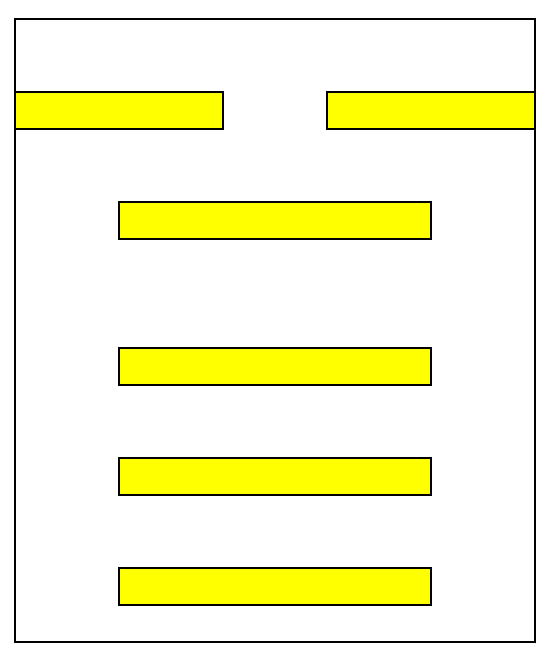
以下のイメージのように、画面全体はColumnを使用して縦にWidgetを並べると同時に、
最初だけ横向きにWidgetを並べるようにしたいです。
発生している問題・エラーメッセージ
dart
1════════ Exception caught by rendering library ═════════════════════════════════════════════════════ 2RenderBox was not laid out: RenderRepaintBoundary#59217 relayoutBoundary=up2 NEEDS-PAINT 3'package:flutter/src/rendering/box.dart': 4Failed assertion: line 1979 pos 12: 'hasSize' 5The relevant error-causing widget was: 6 Column Column:file:///C:/src/delivery_management-master/lib/Page/My/SignUpPage.dart:121:15 7════════════════════════════════════════════════════════════════════════════════════════════════════
該当のソースコード
dart
1import 'package:delivery_management/Common.dart'; 2import 'package:file_picker/file_picker.dart'; 3import 'package:flutter/material.dart'; 4 5import '../../Communication/UserData.dart'; 6import '../TabPage.dart'; 7 8// 新規登録ページ 9class SignUpPage extends StatefulWidget { 10 const SignUpPage({Key? key}) : super(key: key); 11 12 13 _SignUpPageState createState() => _SignUpPageState(); 14} 15 16class _SignUpPageState extends State<SignUpPage> { 17 // 入力チェックに用いる一意なキー 18 final formKeySignUp = GlobalKey<FormState>(); 19 20 // 登録するユーザのカテゴリ: 21 bool userCategoryNinushi = false; 22 bool userCategoryHaisou = false; 23 24 // メールアドレスのTextEditingController 25 final mailController = TextEditingController(); 26 27 // パスワードのTextEditingController 28 final passwordController = TextEditingController(); 29 30 // 住所のTextEditingController 31 final addressController = TextEditingController(); 32 33 34 Widget build(BuildContext context) { 35 return MaterialApp( 36 home: Scaffold( 37 appBar: AppBar( 38 title: const Text("新規登録"), 39 ), 40 body: Column(children: <Widget>[ 41 Expanded(child: SingleChildScrollView(child: Form( 42 key: formKeySignUp, 43 child: Align( 44 alignment: Alignment.topCenter, 45 child: Card(child: ConstrainedBox( 46 constraints: const BoxConstraints(maxWidth: 400), 47 child: Padding( 48 padding: const EdgeInsets.all(10.0), 49 child: Column(children: [ 50 //ここでRowを入れるとレイアウトが表示されない 51 Row(children:<Widget> [ 52 CheckboxListTile( 53 value: userCategoryNinushi, 54 title: const Text( 55 'サンプル1', 56 style: TextStyle( 57 fontWeight: FontWeight.bold, 58 ), 59 ), 60 controlAffinity: ListTileControlAffinity.leading, 61 onChanged: (value) { 62 setState(() { 63 userCategoryNinushi = value!; 64 }); 65 }, 66 ), 67 CheckboxListTile( 68 value: userCategoryHaisou, 69 title: const Text( 70 'サンプル2', 71 style: TextStyle( 72 fontWeight: FontWeight.bold, 73 ), 74 ), 75 controlAffinity: ListTileControlAffinity.leading, 76 onChanged: (value) { 77 setState(() { 78 userCategoryHaisou = value!; 79 }); 80 }, 81 ), 82 ],), 83 TextFormField( 84 controller: mailController, 85 keyboardType: TextInputType.emailAddress, 86 decoration: const InputDecoration( 87 labelText: "メールアドレス"), 88 validator: (value) { 89 if (value!.isEmpty) { 90 return '未入力です'; 91 } 92 return null; 93 }, 94 textInputAction: TextInputAction.next, 95 ), 96 97 TextFormField( 98 controller: passwordController, 99 keyboardType: TextInputType.visiblePassword, 100 obscureText: isHiddenPassword, 101 decoration: InputDecoration( 102 labelText: "パスワード", 103 suffixIcon: IconButton( 104 icon: Icon(isHiddenPassword 105 ? Icons.remove_red_eye 106 : Icons.visibility_off), 107 onPressed: () { 108 setState(() { 109 isHiddenPassword = !isHiddenPassword; 110 }); 111 }), 112 ), 113 validator: (value) { 114 if (value!.isEmpty) { 115 return '未入力です'; 116 } 117 return null; 118 }, 119 textInputAction: TextInputAction.next, 120 ), 121 122 TextFormField( 123 controller: addressController, 124 keyboardType: TextInputType.text, 125 decoration: const InputDecoration(labelText: "住所"), 126 validator: (value) { 127 if (value!.isEmpty) { 128 return '未入力です'; 129 } 130 return null; 131 }, 132 textInputAction: TextInputAction.next, 133 ), 134 ],), 135 ) 136 ),), 137 ) 138 ))), 139 140 Padding( 141 padding: const EdgeInsets.all(10), 142 child: MaterialButton( 143 padding: const EdgeInsets.all(20), 144 color: Colors.red, 145 onPressed: onclickRegistrationButton, 146 child: const Text("登録"), 147 textColor: Colors.white,) 148 ), 149 ]) 150 ),); 151 } 152
試したこと
RowをExpandedで囲んでみましたが、状況は変わりませんでした。
Expandedで囲んだ時、Rowの前にはchildをつけています。
補足情報(FW/ツールのバージョンなど)
AndroidStudio4.01
flutter 3.0.5


回答1件
 ベストアンサー
あなたの回答

tips
プレビュー



2022/11/08 07:28