


リンク先の仕様を読んだところ、extraにはnullではなく、何らかの文字列を指定するようです。
あと、ソースが見づらいので
```Python
ここにソースを貼る
```
ようにしてください。質問は編集できます。
(追記)
extraにはnullではなくextraを指定したのですね。失礼しました。
 Q&A
Q&A
解決済

総合スコア3
投稿2026/01/11 14:39
編集2026/01/12 03:43画像にあるextraの値を得たいです
Bluetooth Battery MonitorのAPIに問い合わせ
###質問の内容
win11でBluetooth Battery Monitorというbluetoothデバイスのバッテリー状況を
モニタするアプリを利用しているのですが(有料、試用期間あり)、
常時表示ができません。ですが、
https://www.bluetoothgoodies.com/info/battery-monitor-api/
このようなAPIが提供されているため、自作に挑戦してみようと思いました。
そこでコードを作ってみたのですが、
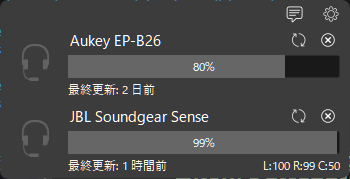
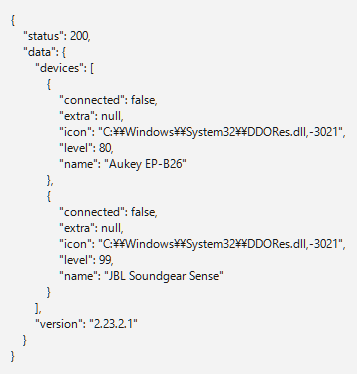
画像のようにJBL Soundgear Senceのextraとして
"L:100 R:99 C:50"の値があるはずだと思うのですが、nullになってしまいます。
Bluetooth Battery Monitorの画面。Soundgear Senceのextraが取得できています
自作コードの実行結果。取得できず、nullに
なぜなのかわかりません。
よろしくお願いします。
python 3.13.3, pyside6 6.10.1, requests 2.32.5

import sys, os
import time
import requests
import json
import atexit
from PySide6.QtCore import Qt
from PySide6.QtWidgets import (QApplication, QWidget, QVBoxLayout, QHBoxLayout,
                                QLabel, QMessageBox
                                )

class MainWindow(QWidget):
    def __init__(self):
        super().__init__()

        atexit.register(self.closing_process)

        self.label_device_01 = QLabel()
        self.label_device_02 = QLabel()
        self.label_device_03 = QLabel()
        self.label_device_04 = QLabel()
        self.label_device_05 = QLabel()

        layout_v = QVBoxLayout()
        layout_h = QHBoxLayout()

        layout_v.addWidget(self.label_device_01)
        self.setLayout(layout_v)

        self.get_devices()

    def get_devices(self):
        devices = requests.get(r"http://127.0.0.1:9876/devices")
        return_data = {"status": devices.status_code, "data": devices.json()}
        json_str = json.dumps(return_data, ensure_ascii=False, indent=4)
        self.label_device_01.setText(json_str)

    def closing_process(self):
        QMessageBox.information(None,"","closing_process実行")

if __name__ == "__main__":
    app = QApplication(sys.argv)
    window = MainWindow()
    #window.setWindowTitle("BluetoothBatteryMonitorUI")
    window.setWindowFlag(Qt.FramelessWindowHint)
    window.show()

    sys.exit(app.exec())
    params = {"extra": "extra"}
    devices = requests.get(r"http://127.0.0.1:9876/devices", params=params)
としてみました。
・Bluetooth Battery Monitorは購入済みです。
・paramsの値をvalue、string、keyなど組み合わせてみました。
・soundgearを一旦削除して、再ペアリングしました。


回答2件
あなたの回答

tips
プレビュー

 ベストアンサー


