


AndroidManifest.xml のすべてのクラス名がエラーになるってことですか?
パッケージ名の書き方が間違ってるか、そもそもクラスが認識されてないのか…。
各クラスのソースコードの先頭部分 (package 宣言と class 定義の最初の行) はどんな感じですか?
あと言語は何 (Java か Kitlin か) でしょうか?
 Q&A
Q&A
解決済

総合スコア19
投稿2023/10/04 11:36
編集2023/10/04 11:40アプリの起動をして画面の表示をさせたい
助けてください・・・
Androidアプリで古いAndroidstudioから最新のに移行して
com.android.tools.build:gradle:3.1.4 からcom.android.tools.build:gradle:7.2.2
gradle version 4.4から7.3.3
compileSdkVersion 30 から34
もろもろコンパイルエラーをかいくぐったところ何とかビルドが通りまして
いざデバッグをしたところ全く画面が表示されず
確認してみたところ、マニフェストファイルの各activityのnameが大量のエラーを吐いておりました。
パッケージ名.クラス名が入っている箇所すべてに下記のエラーが出ております。
Class referenced in the manifest, パッケージ名.クラス名, was not found in the project or the libraries
<?xml version="1.0" encoding="utf-8"?>
<manifest xmlns:android="http://schemas.android.com/apk/res/android"
    package="パッケージ名"
    android:versionCode="12"
    android:versionName="1.7" >

    <uses-permission android:name="android.permission.INTERNET" />
    <uses-permission android:name="android.permission.RECEIVE_BOOT_COMPLETED" />
    <uses-permission android:name="android.permission.WAKE_LOCK" />
    <uses-permission android:name="android.permission.ACCESS_FINE_LOCATION" />
    <uses-permission android:name="android.permission.ACCESS_COARSE_LOCATION" />
    <uses-permission android:name="android.permission.READ_PHONE_STATE" />

    <application
        android:allowBackup="true"
        android:icon="@drawable/ic_launcher"
        android:label="@string/app_name"
        android:theme="@style/AppTheme" >
        <activity
            android:name="パッケージ名.クラス名"
            android:label="@string/app_name"
            android:screenOrientation="fullSensor"
            android:theme="@style/AppThemeFullscreenEmpty" >
            <intent-filter>
                <action android:name="android.intent.action.MAIN" />

                <category android:name="android.intent.category.LAUNCHER" />
            </intent-filter>
        </activity>
        <activity
            android:name="パッケージ名.クラス名"
            android:screenOrientation="fullSensor"
            android:theme="@style/AppThemeBlackDialog" >
        </activity>

        <service
            android:name="jp.co.i_abs.android_tr.CommService"
            android:enabled="true"
            android:exported="false" >
        </service>

        <activity
            android:name="パッケージ名.クラス名"
            android:label="@string/setting_label"
            android:screenOrientation="fullSensor"
            android:theme="@style/AppThemeBlackDialog"
            android:windowSoftInputMode="stateVisible|adjustPan" >
        </activity>
        <activity
            android:name="パッケージ名.クラス名"
            android:label="@string/app_name"
            android:screenOrientation="landscape"
            android:theme="@style/AppThemeFullscreen" >
        </activity>

        <receiver android:name="パッケージ名.クラス名" >
            <intent-filter>
                <action android:name="android.intent.action.BOOT_COMPLETED" />

                <category android:name="android.intent.category.DEFAULT" />
            </intent-filter>
        </receiver>
        <receiver
            android:name="パッケージ名.クラス名"
            android:exported="false" >
            <intent-filter>
                <action android:name="android.intent.action.LOCALE_CHANGED" />
            </intent-filter>
        </receiver>

        <activity
            android:name="パッケージ名.クラス名"
            android:label="@string/app_name"
            android:screenOrientation="landscape"
            android:theme="@style/AppTheme" >
        </activity>
        <activity
            android:name="パッケージ名.クラス名"
            android:screenOrientation="landscape"
            android:theme="@style/AppThemeBlackDialog"
            android:windowSoftInputMode="stateVisible|adjustPan" >
        </activity>
        <activity
            android:name="パッケージ名.クラス名"
            android:label="@string/title_activity_edit_record"
            android:screenOrientation="landscape"
            android:theme="@style/AppThemeBlackDialog"
            android:windowSoftInputMode="stateVisible|adjustPan" >
        </activity>
        <activity
            android:name="jp.co.i_abs.android_tr.ShowRecActivity"
            android:label="@string/app_name"
            android:screenOrientation="landscape" >
        </activity>
        <activity
            android:name="パッケージ名.クラス名"
            android:screenOrientation="landscape"
            android:windowSoftInputMode="stateVisible|adjustPan" >
        </activity>
        <activity
            android:name="パッケージ名.クラス名"
            android:screenOrientation="portrait"
            android:windowSoftInputMode="stateVisible|adjustPan" >
        </activity>
        <activity
            android:name="jp.co.i_abs.android_tr.TmpEmpActivity"
            android:screenOrientation="landscape"
            android:theme="@style/AppThemeBlackDialog"
            android:windowSoftInputMode="stateVisible|adjustPan" >
        </activity>
        <activity
            android:name="パッケージ名.クラス名"
            android:screenOrientation="landscape"
            android:theme="@style/AppThemeBlackDialog"
            android:windowSoftInputMode="stateVisible|adjustPan" >
        </activity>
        <activity
            android:name="パッケージ名.クラス名"
            android:theme="@style/AppThemeBlackDialog"
            android:windowSoftInputMode="adjustResize|stateVisible" >
        </activity>
    </application>

</manifest>
buildscript {
 repositories {
 google()
 mavenCentral()
 }
 dependencies {
 classpath 'com.android.tools.build:gradle:7.2.2'
 }
}
apply plugin: 'com.android.application'

dependencies {
 implementation fileTree(include: '*.jar', dir: 'libs')
 implementation 'com.google.android.gms:play-services-location:21.0.1'
 implementation 'com.squareup.okhttp3:okhttp:3.11.0'
 implementation 'androidx.constraintlayout:constraintlayout:2.1.4'
 implementation "androidx.window:window:1.1.0"
 implementation "androidx.core:core:1.0.0"
 implementation "androidx.preference:preference:1.2.1"
 implementation 'com.google.android.material:material:1.11.0-alpha02'
 implementation 'androidx.viewpager2:viewpager2:1.0.0'

 constraints {
 implementation("org.jetbrains.kotlin:kotlin-stdlib-jdk7:1.8.0") {
 because("kotlin-stdlib-jdk7 is now a part of kotlin-stdlib")
 }
 implementation("org.jetbrains.kotlin:kotlin-stdlib-jdk8:1.8.0") {
 because("kotlin-stdlib-jdk8 is now a part of kotlin-stdlib")
 }
 }
}
allprojects {
 gradle.projectsEvaluated {
 tasks.withType(JavaCompile) {
 options.compilerArgs << "-Xlint:unchecked" << "-Xlint:deprecation"
 }
 }
}
android {
 compileSdkVersion 34
 buildToolsVersion "33.0.2"
 sourceSets {
 main {
 manifest.srcFile 'AndroidManifest.xml'
 java.srcDirs = ['src']
 resources.srcDirs = ['src']
 aidl.srcDirs = ['src']
 renderscript.srcDirs = ['src']
 res.srcDirs = ['res']
 assets.srcDirs = ['assets']
 }

 // Move the tests to tests/java, tests/res, etc...
 androidTest.setRoot('tests')

 // Move the build types to build-types/<type>
 // For instance, build-types/debug/java, build-types/debug/AndroidManifest.xml, ...
 // This moves them out of them default location under src/<type>/... which would
 // conflict with src/ being used by the main source set.
 // Adding new build types or product flavors should be accompanied
 // by a similar customization.
 debug.setRoot('build-types/debug')
 release.setRoot('build-types/release')
 }
 defaultConfig {
 minSdkVersion 29
 targetSdkVersion 34
 compileOptions {
 sourceCompatibility JavaVersion.VERSION_1_8
 targetCompatibility JavaVersion.VERSION_1_8
 }
 }
 productFlavors {
 }
 repositories {
 google()
 jcenter()
 }

}
パッケージ名の確認、修正
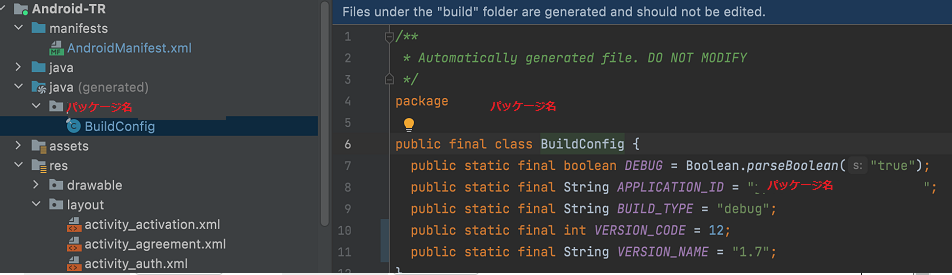
添付した画像なのですが、作成した記憶のないjavaフォルダがあり
中にbuildconfigというファイルがあり自動で生成されているようでした。


回答1件
あなたの回答

tips
プレビュー

 自己解決
自己解決

