


「一番上のセルをタップすると、全てのセルが、全て同じ高さに拡大(縮小)する」という仕様で合ってますか?
 Q&A
Q&A
解決済

総合スコア265
投稿2016/10/26 06:44
編集2016/10/26 10:05###前提・実現したいこと
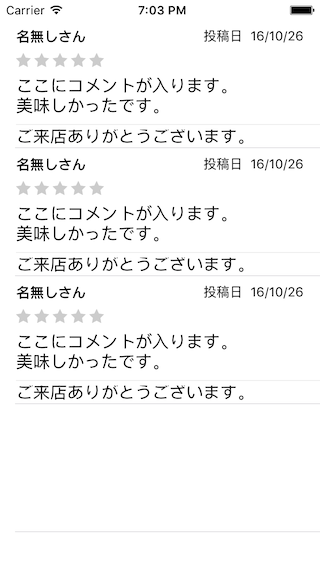
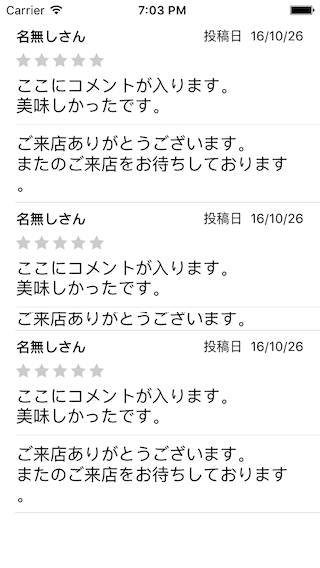
掲題の通りタップ時に適当な大きさに拡縮したいのですが、思い通りの大きさにはなってくれません。
現在数値で「100」を指定しているため、高さ100のセルになっていますが、
・「名無しさん」「★★★★★」「ここにコメント〜美味しかったです」までの高さをタップする前の高さ
・線を跨ぎ、「ご来店ありが〜お待ちしております」までの高さをタップ後の高さ
として実装したいと思っています。


###該当のソースコード
Swift
1class ViewController: UIViewController, UITableViewDataSource { 2 3 @IBOutlet weak var tableView: UITableView! 4 5 var toggle = true 6 var toggleArray = [true, false, true] 7 var rowHeight: CGFloat = 44.0 8 9 override func viewDidLoad() { 10 super.viewDidLoad() 11 } 12 13 override func viewDidLayoutSubviews() { 14 super.viewDidLayoutSubviews() 15 16 if let cell = tableView.dequeueReusableCellWithIdentifier("Cell") { 17 rowHeight = CGRectGetHeight(cell.frame) 18 print("rowHeight=", rowHeight) 19 } 20 } 21 22 func tableView(tableView: UITableView, numberOfRowsInSection section: Int) -> Int { 23 return 3 24 } 25 26 func tableView(tableView: UITableView, cellForRowAtIndexPath indexPath: NSIndexPath) -> UITableViewCell { 27 let cell = tableView.dequeueReusableCellWithIdentifier("Cell", forIndexPath: indexPath) as! CustomCell 28 cell.setText() 29 return cell 30 } 31 32 func tableView(tableView: UITableView, heightForRowAtIndexPath indexPath: NSIndexPath) -> CGFloat { 33 if toggleArray[indexPath.row] == true { 34 if toggle { 35 return rowHeight 36 } else { 37 return UITableViewAutomaticDimension 38 } 39 } else { 40 return rowHeight 41 } 42 } 43 44 func tableView(tableView: UITableView, didSelectRowAtIndexPath indexPath: NSIndexPath) { 45 if toggleArray[indexPath.row] == true { 46 toggle = !toggle 47 tableView.reloadRowsAtIndexPaths(tableView.indexPathsForVisibleRows!, withRowAnimation: UITableViewRowAnimation.Fade) 48 } 49 } 50 51 func tableView(tableView: UITableView, estimatedHeightForRowAtIndexPath indexPath: NSIndexPath) -> CGFloat { 52 return self.tableView(tableView, heightForRowAtIndexPath: indexPath) 53 } 54 55}
###試したこと
tableView.rowHeight = UITableViewAutomaticDimensionで高さを調節しているのなら
調整後のtableView.rowHeightから線より下のUIの高さを引けばよいのではないかと考えましたが。
そもそもtableView.rowHeightの認識が間違っていたため実装を断念しました。
###補足情報(言語/FW/ツール等のバージョンなど)
・Swift2.2
・Xcode7.3.1
・こちらのサイトを参考にしています。
###追記


回答1件
あなたの回答

tips
プレビュー

 ベストアンサー


