

 Q&A
Q&A
カウントダウンタイマーをカップ麺タイマーに変えようと色々やっています。
設定時間の変更は出来ているようですがタイマーが動きません。
それで、119行目にlet checkValue = 180 * 1000;で初期値を追加したら3分の時は動くようになりました。時間を変えて動かすにはどうしたら良いですか?
元のコード。
HTML
1<!DOCTYPE html> 2<html lang="ja"> 3 4<head> 5 <meta charset="UTF-8"> 6 <meta name="viewport" content="width=device-width, initial-scale=1.0"> 7 <title>Document</title> 8</head> 9 10<body> 11 <main> 12 <p id="timer">00:03</p> 13 <button id="btn">Start</button> 14 </main> 15 16 17 <style> 18 body { 19 background: #e6f6ff; 20 } 21 22 main { 23 background: #fff; 24 width: 320px; 25 margin: 16px auto 0; 26 text-align: center; 27 padding: 16px; 28 } 29 30 p { 31 margin: 0; 32 background: #ddd; 33 padding: 32px 0; 34 font-size: 40px; 35 font-family: 'Courier New'; 36 } 37 38 button { 39 all: unset; 40 width: 100%; 41 background: #08c; 42 color: #fff; 43 font-weight: bold; 44 padding: 16px 0; 45 margin-top: 16px; 46 cursor: pointer; 47 } 48 49 button:hover { 50 opacity: 0.6; 51 } 52 53 button:active { 54 opacity: 0.4; 55 } 56 57 .inactive { 58 background: #ddd; 59 color: #444; 60 cursor: default; 61 } 62 63 .inactive:hover { 64 opacity: 1; 65 } 66 </style> 67 68 69 <script> 70 'use strict'; 71 72 { 73 function check() { 74 // 残り時間 = 終了時刻 - 現在時刻 75 let countdown = endTime - new Date().getTime(); 76 77 // (3) タイマーの終了 78 if (countdown < 0) { 79 clearInterval(intervalId); 80 countdown = 3 * 1000; 81 82 btn.disabled = false; 83 btn.classList.remove('inactive'); 84 } 85 86 const totalSecond = Math.floor(countdown / 1000); 87 // 80秒 → 1分20秒 88 // 80 ÷ 60 = 1 余り 20 89 // 80 / 60 = 1.33333.... → 1 90 // 80 % 60 = 20 91 const minutes = Math.floor(totalSecond / 60); 92 const seconds = totalSecond % 60; 93 94 const minutesFormatted = String(minutes).padStart(2, '0'); 95 const secondsFormatted = String(seconds).padStart(2, '0'); 96 97 timer.textContent = `${minutesFormatted}:${secondsFormatted}`; 98 } 99 100 const timer = document.querySelector('#timer'); 101 const btn = document.querySelector('#btn'); 102 let endTime; 103 let intervalId; 104 105 // (1) 終了時刻を求める 106 btn.addEventListener('click', () => { 107 endTime = new Date().getTime() + 3 * 1000; 108 109 btn.disabled = true; 110 btn.classList.add('inactive'); 111 112 // (2) 残り時間を求める 113 intervalId = setInterval(check, 100); 114 }); 115 116 } 117 </script> 118 119</body> 120 121</html>
改変中のコード。
HTML
1<!DOCTYPE html> 2<html lang="ja"> 3 4<head> 5 <meta charset="UTF-8"> 6 <meta name="viewport" content="width=device-width, initial-scale=1.0"> 7 <title>Document</title> 8</head> 9 10<body> 11 <main> 12 <div> 13 <h3>カップ麺タイマー</h3> 14 </div> 15 16 <form id="selectTime"> 17 <label><input type="radio" name="hotWaterIn" value="180 * 1000">3分</label> 18 <label><input type="radio" name="hotWaterIn" value="300 * 1000">5分</label> 19 <label><input type="radio" name="hotWaterIn" value="600 * 1000">10分</label> 20 <label><input type="radio" name="hotWaterIn" value="30 * 1000">Test</label> 21 </form> 22 23 <p id="timer">00:03</p> 24 <button id="btn">Start</button> 25 </main> 26 27 28 <style> 29 body { 30 background: #e6f6ff; 31 } 32 33 main { 34 background: #fff; 35 width: 320px; 36 margin: 16px auto 0; 37 text-align: center; 38 padding: 16px; 39 } 40 41 p { 42 margin: 0; 43 background: #ddd; 44 padding: 32px 0; 45 font-size: 40px; 46 font-family: 'Courier New'; 47 } 48 49 button { 50 all: unset; 51 width: 100%; 52 background: #08c; 53 color: #fff; 54 font-weight: bold; 55 padding: 16px 0; 56 margin-top: 16px; 57 cursor: pointer; 58 } 59 60 button:hover { 61 opacity: 0.6; 62 } 63 64 button:active { 65 opacity: 0.4; 66 } 67 68 .inactive { 69 background: #ddd; 70 color: #444; 71 cursor: default; 72 } 73 74 .inactive:hover { 75 opacity: 1; 76 } 77 </style> 78 79 80 <script> 81 'use strict'; 82 83 { 84 function selectTimeChange(event) { 85 checkValue = selectTime.elements['hotWaterIn'].value; 86 console.log(`設定時間は${checkValue}です`); 87 } 88 89 function check() { 90 // 残り時間 = 終了時刻 - 現在時刻 91 let countdown = endTime - new Date().getTime(); 92 93 // (3) タイマーの終了 94 if (countdown < 0) { 95 clearInterval(intervalId); 96 countdown = checkValue; 97 98 btn.disabled = false; 99 btn.classList.remove('inactive'); 100 } 101 102 const totalSecond = Math.floor(countdown / 1000); 103 // 80秒 → 1分20秒 104 // 80 ÷ 60 = 1 余り 20 105 // 80 / 60 = 1.33333.... → 1 106 // 80 % 60 = 20 107 const minutes = Math.floor(totalSecond / 60); 108 const seconds = totalSecond % 60; 109 110 const minutesFormatted = String(minutes).padStart(2, '0'); 111 const secondsFormatted = String(seconds).padStart(2, '0'); 112 113 timer.textContent = `${minutesFormatted}:${secondsFormatted}`; 114 } 115 116 let selectTime = document.querySelector('#selectTime'); 117 selectTime.elements[0].checked = true; 118 selectTime.addEventListener('change', selectTimeChange); 119 let checkValue = 180 * 1000; 120 121 const timer = document.querySelector('#timer'); 122 const btn = document.querySelector('#btn'); 123 let endTime; 124 let intervalId; 125 126 // (1) 終了時刻を求める 127 btn.addEventListener('click', () => { 128 endTime = new Date().getTime() + checkValue; 129 130 btn.disabled = true; 131 btn.classList.add('inactive'); 132 133 // (2) 残り時間を求める 134 intervalId = setInterval(check, 100); 135 }); 136 137 } 138 </script> 139 140</body> 141 142</html>
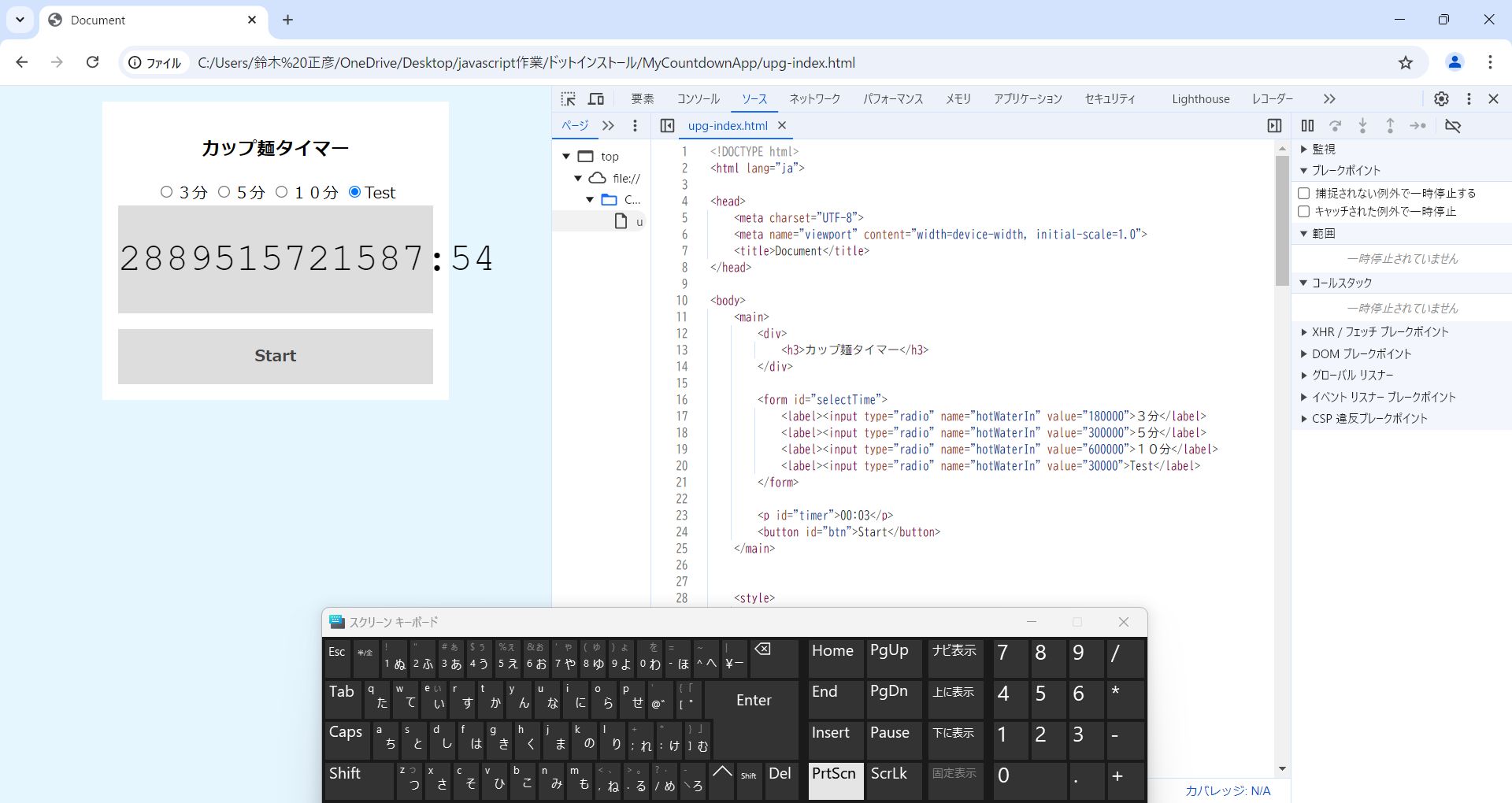
HTMLのvalue値を式から数字にしたらタイマーは動きますが3分の時以外は表示がおかしいです。


回答1件
 ベストアンサー
あなたの回答

tips
プレビュー



2024/12/09 07:13 編集
2024/12/09 07:38
2024/12/09 09:47